Creating a 3D Christmas Gift Box: A Comprehensive Guide
As the holiday season approaches, many of us are looking for unique and creative ways to make our gifts stand out. One such way is by using a 3D Christmas Gift Box. These boxes not only add a special touch to your presents but also serve as beautiful decorations for your Christmas tree or other festive spaces. Whether you're a beginner or an experienced crafter, creating a 3D Christmas Gift Box can be a rewarding and enjoyable project.
What is a 3D Christmas Gift Box?
A 3D Christmas Gift Box is a three-dimensional box that you can create using various design software and print on high-quality materials. These boxes can be used to hold small gifts, treats, or even as standalone decorations. The beauty of a 3D Christmas Gift Box lies in its versatility and the ability to customize it with your own designs, colors, and patterns.
Why Choose a 3D Christmas Gift Box?
There are several reasons why a 3D Christmas Gift Box is a great choice for your holiday projects:
- Versatility: Use them as gift containers, tree ornaments, or decorative elements.
- Customization: Tailor the design to match your personal style or the recipient's preferences.
- Professional Quality: High-resolution prints and detailed designs make your gifts look professional and polished.
Common Mistakes to Avoid
While creating a 3D Christmas Gift Box can be a fun and rewarding experience, there are some common mistakes that people often make. Here are a few to watch out for:
1. Choosing the Wrong Design Software
One of the most common mistakes is selecting a design software that doesn't meet your needs. Different software has different capabilities, and not all are suitable for creating 3D designs. For example, Adobe Illustrator is great for vector graphics, while Cricut Design Space is more user-friendly for beginners. Make sure to choose a software that aligns with your skill level and project requirements.
2. Overlooking Print Quality
The quality of your print can significantly impact the final product. Low-resolution images and poor print settings can result in blurry, unprofessional-looking boxes. Always use high-quality, 300 dpi images and ensure your printer settings are optimized for the best results.
3. Not Testing the Design Before Printing
It's easy to get excited and jump straight into printing, but this can lead to wasted materials and time. Always test your design on a small scale before committing to a full print run. This allows you to catch any issues and make necessary adjustments without wasting resources.
4. Ignoring File Formats
Using the correct file format is crucial for compatibility with your design software and printing equipment. Common formats like AI, SVG, DXF, and PDF each have their specific uses. For instance, SVG files are ideal for Cricut Design Space, while DXF files work well with Glowforge. Ensure you have the right file format for your specific needs.
Practical Advice for Creating a 3D Christmas Gift Box
To help you avoid these common pitfalls and create a stunning 3D Christmas Gift Box, here are some practical tips:
- Choose the Right Software: Select a design software that matches your skill level and project requirements. Popular options include Adobe Illustrator, Cricut Design Space, and Inkscape.
- Use High-Quality Images: Always use 300 dpi images for the best print quality. This ensures that your designs are clear and professional.
- Test Your Design: Before printing in bulk, test your design on a small scale. This helps you identify and fix any issues before committing to a larger print run.
- Check File Formats: Make sure you have the correct file formats for your design software and printing equipment. Common formats include AI, SVG, DXF, and PDF.
What You Get with Our 3D Christmas Gift Box Download
When you purchase our 3D Christmas Gift Box download, you will receive a comprehensive package that includes:
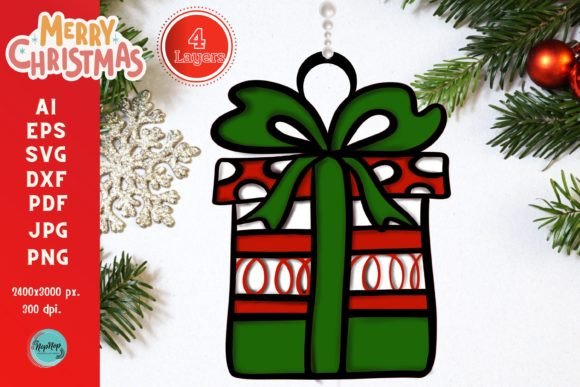
- 4 Layered Designs: Each design is carefully crafted to provide a variety of options for your projects.
- High-Resolution Artwork: All designs are in 8.5"x11" size and 300 dpi resolution, ensuring top-notch quality.
- Multiple File Formats: The download includes AI, ESP, SVG, DXF, JPEG, PNG, and PDF files, making it compatible with a wide range of design software and cutting machines.
- Color PNG or JPEG Example File: A color example file is included to give you a visual reference of the final product.
Please note that this is a digital instant download, and no physical item will be sent to you. Thank you for visiting my store 🙏🙏.
By following these tips and avoiding common mistakes, you can create a beautiful and professional 3D Christmas Gift Box that will impress your friends and family. Happy crafting!